
Jenkins
Learn Jenkins to automate build, test, and deployment with CI/CD pipelines, plugins, and integrations used in real DevOps environments.
Jenkins
Learning Jenkins is crucial for IT professionals due to its central role in continuous integration and continuous delivery (CI/CD) pipelines. As an open-source automation server, Jenkins automates the building, testing, and deployment of software projects, enabling candidates to create efficient workflows and integrate seamlessly with version control systems.
| Duration | 1 Week | Class Hours | 1 hour/day |
| Lab Hours | 1 hour/day | Prerequisite | Basic understanding of Continuous Integration and Deployment |
| Certificate | After successful completion of training | Trainer | Industry Experienced Mentor |
| Study Material | Books, Notes and Online Tests | Online Test | Unlimited |
| Project | Yes | Lectures In | English / Hinglish / Hindi |
| Fees | Please Call | Placement Support | No |
| Weekend Class |
1st Saturday - 6 hours (Theory +
Practical) 2nd Saturday - 6 hours (Theory + Practical) |
Complimentary | Laptop Bag and T-Shirt |
About Jenkins
Jenkins's extensive plugin ecosystem and integration capabilities make it adaptable to various development environments, supporting tools for code quality, testing, and deployment. Its widespread use in the DevOps community ensures robust resources and support, allowing professionals to enhance software delivery, collaboration, and accelerate application deployment.
Following Key Topics to Cover in Jenkins-
8 Modules · 1 Week
-
- What is Jenkins?
- Overview of CI/CD
- Jenkins Architecture
- Installation and Configuration
-
- Introduction to Jenkins Pipeline
- Creating and Managing Pipelines
- Declarative vs. Scripted Pipelines
- Pipeline Syntax and DSL
-
- Overview of Jenkins Plugins
- Installing and Managing Plugins
- Popular Jenkins Plugins
- Custom Plugin Development
-
- Integration with Version Control Systems (Git, SVN)
- Integration with Build Tools (Maven, Gradle)
- Integration with Testing Frameworks (JUnit, TestNG)
- Integration with Artifact Repositories (Nexus, Artifactory)
-
- Managing Jenkins Users and Permissions
- Configuring Jenkins Nodes and Executors
- Securing Jenkins with Authentication and Authorization
- Backup and Restore Strategies
-
- CI/CD Best Practices
- Optimizing Jenkins Performance
- Scaling Jenkins for Large Environments
- Monitoring and Logging
-
- Deploying Jenkins on Cloud Platforms (AWS, Azure)
- Containerizing Jenkins with Docker
- Serverless Jenkins with AWS Lambda
- Managing Jenkins Infrastructure as Code
-
- Introduction to Jenkins Pipeline as Code
- Defining Pipelines with Groovy DSL
- Automating Pipeline Configuration
- Testing and Debugging Pipelines
Mastering Jenkins is essential for automating software delivery pipelines, improving development practices, and accelerating the release cycle of applications. This curriculum covers the fundamental topics needed to become proficient in Jenkins automation. By understanding these concepts, you can streamline your development workflow, enhance collaboration, and deliver high-quality software with confidence.
Why Should a Student or Professional Learn Jenkins?
- Automation: Jenkins enables automation of repetitive tasks, including building, testing, and deploying software, leading to increased efficiency and productivity.
- Continuous Integration and Delivery: Jenkins facilitates continuous integration and delivery practices, allowing teams to deliver software updates faster and with higher quality.
- Scalability and Flexibility: Jenkins can scale to support large and complex projects and is highly customizable through its plugin architecture, making it suitable for diverse development environments and workflows.
- Community and Ecosystem: Jenkins has a large and active community, along with a vast ecosystem of plugins and integrations, ensuring support, resources, and extensibility for various use cases and technologies.
Whether you're a student looking to enhance your skills or a professional seeking to stay relevant in the rapidly evolving DevOps landscape, learning Jenkins is a valuable investment that can open up new career opportunities and empower you to deliver software efficiently and effectively.
Interesting Facts
Jenkins is a popular open-source automation server used to build, test, and deploy software. Here are some interesting facts about Jenkins:
1. Origin of Jenkins
Hudson Roots
Jenkins was originally developed as Hudson in 2004 by Kohsuke Kawaguchi at Sun Microsystems. It was renamed Jenkins in 2011 after a dispute over naming rights.
2. Open-Source Automation
Continuous Integration
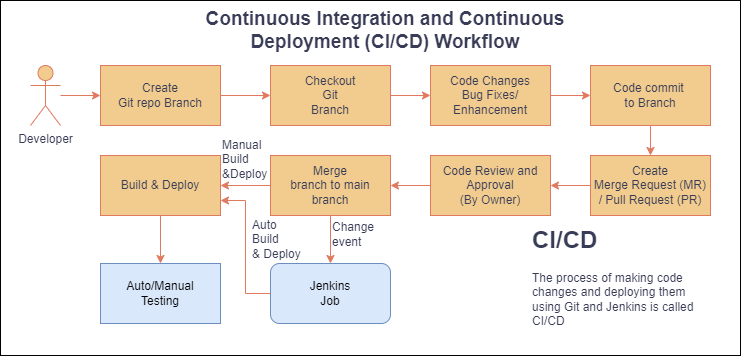
Jenkins is a leading tool for continuous integration (CI) and continuous delivery (CD), automating the parts of software development related to building, testing, and deploying, facilitating DevOps practices.
3. Extensibility
Plugins Ecosystem
Jenkins boasts a rich ecosystem with over 1,500 plugins, allowing it to integrate with various tools and platforms, adapting to different workflows and needs.
4. Jenkins Pipeline
Declarative Pipelines
Jenkins Pipeline is a suite of plugins that supports building continuous delivery pipelines. It allows you to define your entire build process, from testing to deployment, as code.
5. Community and Support
Active Community
Jenkins has a large and active community that contributes to its development and maintenance. This community support makes Jenkins a reliable and constantly improving tool.
6. Scalability
Master-Agent Architecture
Jenkins can be scaled across multiple machines using its master-agent architecture, distributing the workload and making it suitable for projects of any size.
7. Security Features
Role-Based Access
Jenkins provides role-based access control to manage permissions for users and teams, ensuring secure collaboration.
8. Jenkins X
Cloud-Native Jenkins
Jenkins X is an open-source project that extends Jenkins to provide automated CI/CD for cloud-native applications, with features tailored for Kubernetes environments.
9. Integration with Other Tools
Seamless Integration
Jenkins integrates with a wide range of development, testing, and deployment tools, making it a central hub in the DevOps toolchain.
10. Jenkins Blue Ocean
User-Friendly Interface
Blue Ocean is a Jenkins plugin that provides a modern, visual interface for creating, viewing, and managing Jenkins pipelines, enhancing the user experience.
Training Program Fee
Get Personalized Career Guidance
Our admissions team specializes in helping students choose the right career path for their goals.